
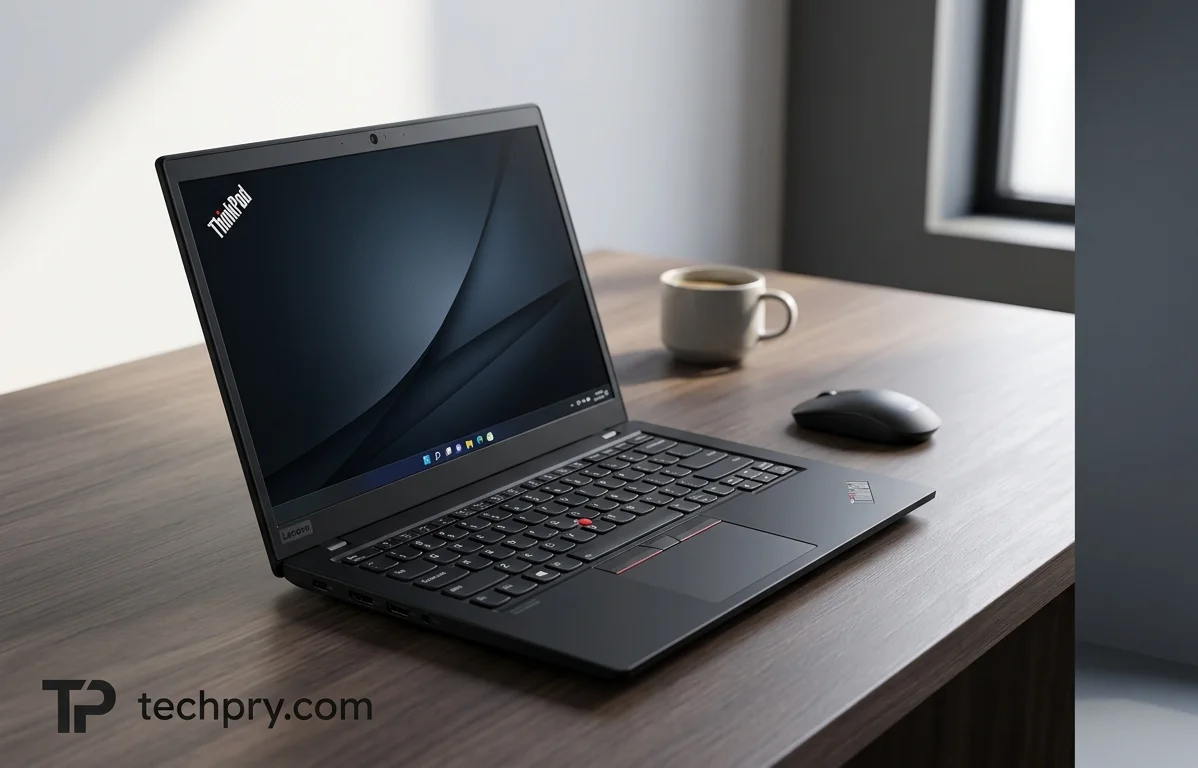
Lenovo ThinkPad L14 Gen 6 (Intel): Strong Ports and Easy Repairs, Held Back by Plastic and a Narrow Gamut
The L14 Gen 6 earns its keep with a dense port selection, a screen bright enough for lit offices and an interior that mostly unscrews, but its plastic build and thin color gamut are real compromises.
Contents
- Ports: a very complete wired set, as one outlet describes it
- USB-C goes Thunderbolt: the biggest change from Gen 5
- Three USB-A ports, but one is USB 2.0 despite the spec's USB 3.2 listing
- HDMI, Ethernet and a combo jack, plus what is missing
- Keyboard and touchpad: good marks from both outlets
- Keyboard: accurate typing, even with shallower keys
- Touchpad: large and precise, with a red pointing stick above it
- Chassis: sturdy in use, plastic in feel
- Looks: all black, plain and quick to show fingerprints
- Display: bright, matte, 16:10 at 1920 x 1200
- Color coverage: 100% on the spec sheet, about 57% in one outlet's figures
- Hinge: opens flat to 180 degrees, but not one-handed
- Repairability and upgrades: ten screws to an interior that mostly swaps out
- Weight and thickness: 1.38 kg on paper, heavier and thicker elsewhere
- Webcam and security: adequate for calls, with a physical shutter and optional biometrics
- Processor and graphics: a 12-core Core Ultra 5 with Arc integrated graphics
- Memory, storage and operating system options
- Battery and charging: 46.5 Wh and a 65 W USB-C charger
- Audio: stereo speakers, Atmos support and two microphones
- Cooling: one fan and 38 dB at full load
- Wireless: current Wi-Fi and Bluetooth versions
- Who it suits, and who should skip it
The ThinkPad L14 Gen 6 puts its effort into the unglamorous parts of an office laptop: USB-C ports that double as Thunderbolt connections, a body that opens with ten screws and a bright matte screen. It saves where a showroom would look, on premium materials and wide color. That split, more than any single spec, sets it apart from pricier ThinkPads and decides who should buy it.
One caution before the details. Notebookcheck and cellphones.com.vn both looked at AMD-powered versions, while the specification used here is the Intel Core Ultra 5 configuration, so wherever their numbers differ from the spec sheet, both sides are shown. Their remarks on the keyboard, hinge, panel size and most ports match the spec, but weight, thickness, materials, color coverage and brightness come out differently.
Ports: a very complete wired set, as one outlet describes it
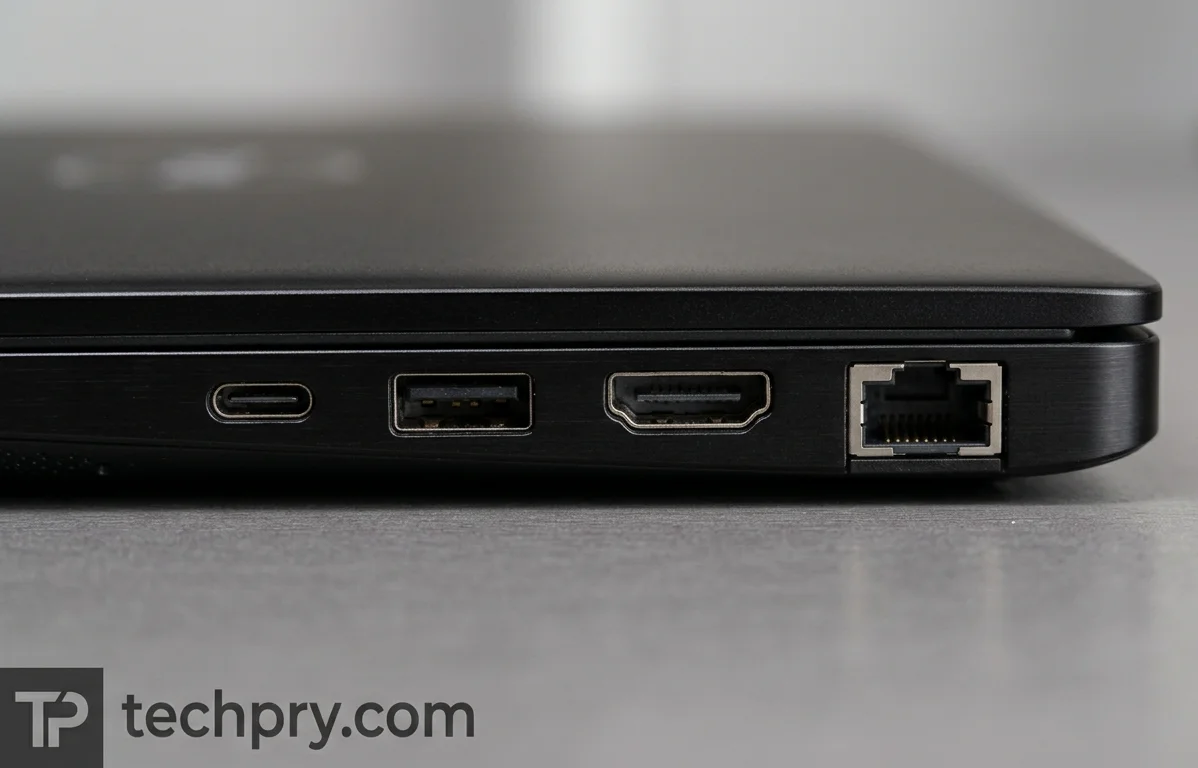
Almost every wired connection an office still uses is here: two USB-C ports, three USB-A ports, HDMI, Ethernet and a 3.5 mm combo jack. cellphones.com.vn calls the list very complete and says it lets owners attach their whole set of peripherals easily. The USB-C and USB-A details are where the sources stop agreeing with each other, so they get their own notes.
USB-C goes Thunderbolt: the biggest change from Gen 5
Both USB-C ports are ports, and both Notebookcheck and cellphones.com.vn count that as a clear plus. The spec lists them as USB 4.0, and LaptopMedia adds DisplayPort output over USB-C. Notebookcheck says the change makes the L series more flexible and puts it level with the T series on USB-C capability, while cellphones.com.vn points to professional , two 4K displays and an as things the standard now allows.
Against the , Notebookcheck says the physical ports are otherwise unchanged, so the swap from one USB4 port plus one USB-C 3.2 Gen 1 port to two Thunderbolt 4 ports is the concrete difference between generations. For a buyer weighing an older Gen 5 against this one, the practical question is whether a dock or a second monitor is in the plan. If it is, the Gen 6 ports remove a limitation; if not, little else in the port list changes.
Three USB-A ports, but one is USB 2.0 despite the spec's USB 3.2 listing
The spec sheet lists all three USB-A ports as USB 3.2, yet three other sources point to a slower one. Notebookcheck says the third USB-A is only USB 2.0 and regrets it, LaptopMedia's page for the Intel series lists one USB-A port as 2.0, and cellphones.com.vn describes a USB-A 2.0 port meant for a mouse. LaptopMedia also notes that one of the faster ports, running at speed (5 Gbps), supports Sleep and Charge.
Because the Intel-series page repeats what Notebookcheck and cellphones.com.vn found on AMD-powered units, the likelier explanation is that the spec sheet's blanket USB 3.2 entry is loose, not that one variant differs from the other. The daily cost is small if you plan for it: two fast ports for external drives, and one slow port best kept for a mouse receiver. Notebookcheck still counts three USB-A ports as an edge over the two on the .
HDMI, Ethernet and a combo jack, plus what is missing
Video and network duties fall to a single output that handles 4K at 60 Hz and an port rated for 10, 100 and 1000 Mbit/s, with a 3.5 mm combo jack for audio. There is no dedicated DisplayPort, no VGA, no SD card reader, no proprietary charging port and no optical drive. Charging therefore runs through USB-C, and anyone who offloads photos from a camera card will need an adapter.
cellphones.com.vn welcomes the Ethernet socket because RJ45 is disappearing from thin laptops, and finds the way the ports are divided up quite suitable. That welcome pairs with the thick body: Notebookcheck calls this the thickest laptop in its comparison group, and a full-size Ethernet socket is the sort of connector thinner designs tend to drop.
Keyboard and touchpad: good marks from both outlets
Yes, both are well rated: Notebookcheck calls the input devices great, and cellphones.com.vn says typing is good thanks to a decent keyboard and touchpad. cellphones.com.vn qualifies its praise with one caveat about key feel, covered below, but both land on a positive verdict.
Keyboard: accurate typing, even with shallower keys
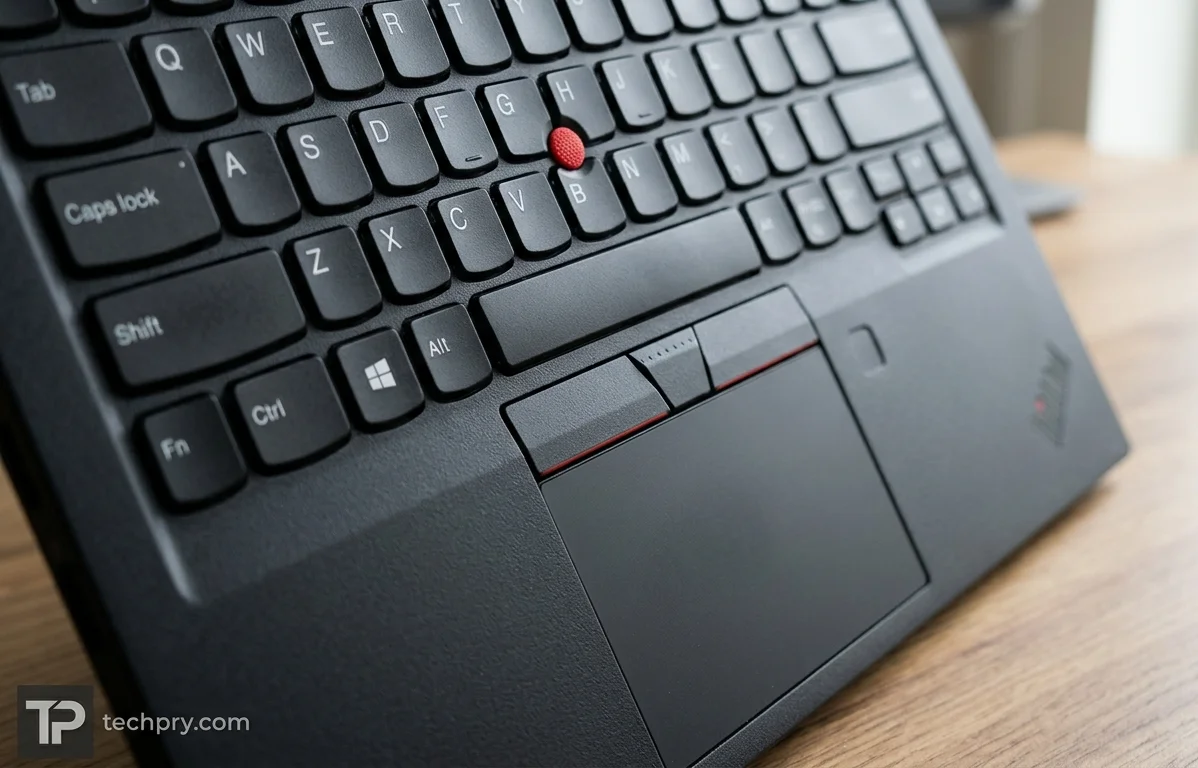
Shallower keys are the one caveat. The drops the numeric keypad and offers an optional backlight, and its is 1.5 mm, down from 1.8 mm on the previous model. cellphones.com.vn says the shorter travel somewhat dulls the feel under the fingers, partly because its author finds very thin laptops bland to type on. The same author says good tactile bounce keeps typing fairly accurate, and finds the layout sensible, with Home, End, Page Up and Page Down slightly small but still separated from each other.
So the reported cost is feel, not accuracy. Those who type for hours and like deep keys should try one before buying, and the missing numeric keypad will matter mostly to anyone who keys in long columns of figures.
Touchpad: large and precise, with a red pointing stick above it
The pointing options are a large touchpad and a red stick. The 11.5 x 6.0 cm touchpad is a with a plastic surface, and cellphones.com.vn praises it as large, smooth and very accurate. Physical mouse buttons and the red sit above it. The same outlet calls the TrackPoint indispensable for engineers and office users who need fast pointer control without taking their hands off the keyboard.
That makes the pointing stick a feature for some people and a red dot for the rest: it earns its place for anyone who keeps their hands on the home row, and it can be ignored by people who prefer the touchpad.
Chassis: sturdy in use, plastic in feel
It is mostly plastic, and both Notebookcheck and cellphones.com.vn call it sturdy while also faulting the materials as not premium. Notebookcheck describes a rather thick plastic chassis, with rough plastic on the bottom cover and screen bezel and a smooth coating on the palmrest and lid, and rates its stability as good and not far behind the pricier . cellphones.com.vn says the sturdiness is beyond question even though plastic lacks the luxury of the aluminum alloy on higher-end lines.
The spec sheet describes an aluminum top over a plastic middle and bottom. cellphones.com.vn contradicts that: it says the whole body is with no metal, and that the only metal on the frame is probably the hinges. Notebookcheck's account of a coated lid on a plastic chassis does not mention aluminum either, so a buyer counting on a metal lid should not rely on the spec line. Both outlets note recycled material in the chassis, and Notebookcheck adds that the packaging is fully recyclable.
Of the two verdicts, sturdiness is the one that matters for a work laptop that travels; the materials complaint is mostly about how it looks and feels next to aluminum models.
Looks: all black, plain and quick to show fingerprints
Black all over, and by both outlets' account plain: Notebookcheck sees little visual or haptic flair apart from a few touches of red, and cellphones.com.vn says nothing catches the eye. cellphones.com.vn also finds the look elegant and suited to businesspeople. In a corporate fleet that restraint is an asset, while someone choosing on style will find nothing here to compete with flashier machines. Fingerprints show up fast on the surface, Notebookcheck says, though they are not hard to wipe off.
Display: bright, matte, 16:10 at 1920 x 1200
Brightness is the screen's best trait. The panel is a 14-inch with a 16:10 aspect ratio and 1920 x 1200 resolution, and the spec lists a 400-nit maximum. Notebookcheck calls the screen bright, and cellphones.com.vn reports 423 nits in practice, against a roughly 300-nit average for rivals at the same price. That reading sits above the spec figure and comes from an AMD-powered unit, so it is a sign of headroom rather than a promise.
The coating is matte, so this is a that should cope with office lighting better than a glossy one, though no ambient light sensor is fitted to adjust brightness automatically.
The rest of the panel is conventional: 60 Hz, 162 ppi, 1000:1 contrast and a 25 ms response time, with no touch, HDR or adaptive refresh. Those numbers suit documents, spreadsheets and video calls, and they say the panel is not built for fast motion or HDR video. The side bezels measure 6.1 mm, for a screen-to-body ratio of about 80.2%.
Color coverage: 100% on the spec sheet, about 57% in one outlet's figures
Weak, by the outlets' account: both Notebookcheck and cellphones.com.vn criticize the color gamut as lacking, and cellphones.com.vn puts coverage at only about 57% , calling it an average-quality screen. The spec sheet claims 100% sRGB, 39.9% and 38.5% . The headline numbers do not fit together, and the evidence does not settle which one a given unit will match; the tested unit was an AMD version, so differences between variants cannot be ruled out.
The spec's own wide-gamut figures are low and sit awkwardly beside a full sRGB claim; they fit the complaint better than the headline figure does. In daily use that means a screen that is bright but not vivid: fine for documents, mail and the web, a poor choice for anyone judging photos or video by color.
Hinge: opens flat to 180 degrees, but not one-handed
Flat opening to 180 degrees comes courtesy of metal hinges, and the laptop is not a convertible. Both Notebookcheck and cellphones.com.vn report little screen wobble, and cellphones.com.vn adds that the screen stays put even while the laptop is being moved. The price is stiffness: both say the lid cannot be opened with one hand. Notebookcheck notes these are the same metal hinges used on the ThinkPad T14.
The two traits come from one design choice, since cellphones.com.vn attributes the steadiness to the hinge being quite stiff. Whether that is a good trade depends on use: it helps on a desk or when the laptop gets carried and jostled, and it annoys anyone who opens the lid one-handed while holding a coffee or a phone.
Repairability and upgrades: ten screws to an interior that mostly swaps out
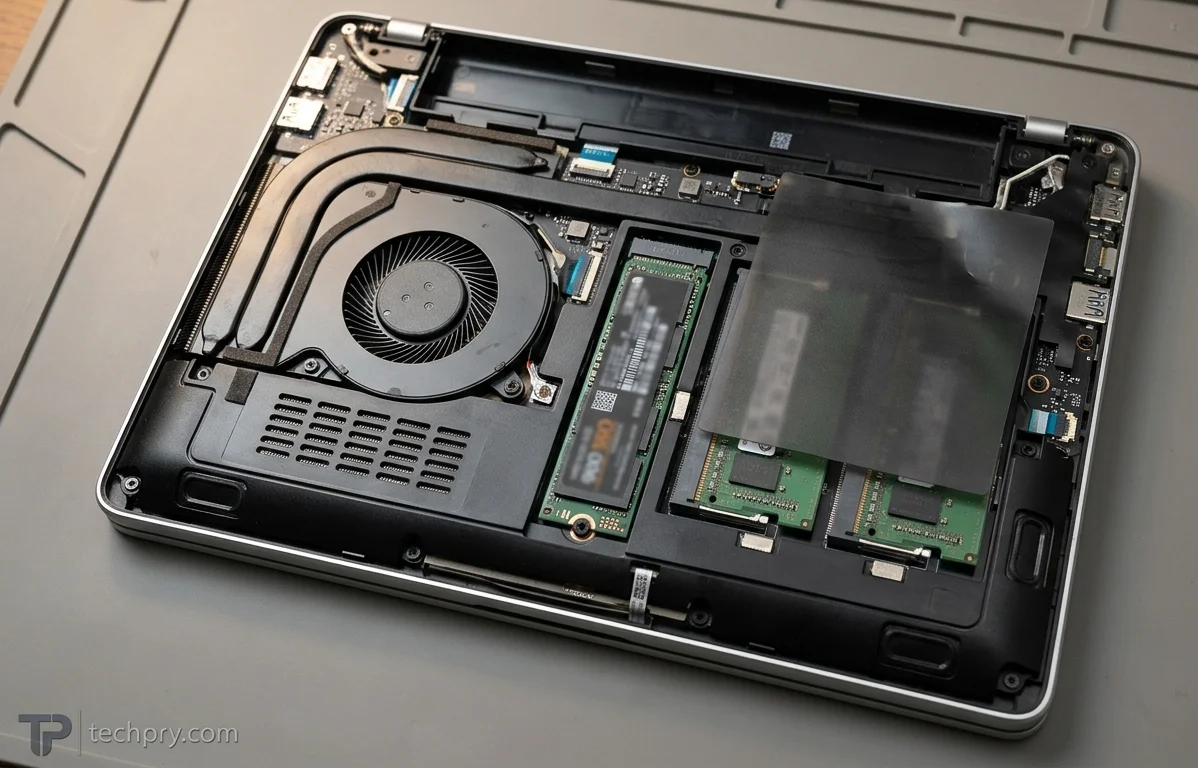
Yes: Notebookcheck praises excellent repairability and upgradeability, and the spec confirms that RAM and storage are upgradable. Ten captive Phillips screws and some clips around the edges hold the back cover, and once it is off, most components are easily replaceable. That includes the fan, the and the two slots hidden under a plastic flap.
The upgrade ceiling is high compared with the starting point: the spec supports up to 64 GB of RAM in 2 slots plus one M.2 storage slot, while the base configuration lists a single 8 GB module. That arrangement suggests a free second slot, so the smallest configuration can grow without replacing the machine.
Both outlets say the keyboard is easy to replace, needing only two screws and two ribbon cables. Notebookcheck adds that the right-side ports sit on a daughterboard and are easy to repair, but that the left-side ports, the Wi-Fi card and the CPU are soldered. The parts that wear or get outgrown are therefore the ones that unscrew, while the soldered parts cannot be upgraded later. On the battery the sources split: Notebookcheck lists it among the easily replaceable parts, while the spec says it is not replaceable. Anyone counting on a self-swapped battery should check the seller or the maintenance manual for the exact configuration first.
Weight and thickness: 1.38 kg on paper, heavier and thicker elsewhere
On paper this laptop weighs 1.38 kg and measures 313.7 x 226 x 17.01-21.5 mm, with a footprint of 709 cm2, but other sources put it heavier and thicker.
| Measure | Spec | LaptopMedia | cellphones.com.vn |
|---|---|---|---|
| Weight | 1.38 kg | 1.38 kg | about 1.56 kg |
| Thickness | 17.01-21.5 mm | 17.01-22.90 mm | about 23 mm |
Notebookcheck calls it the thickest laptop in its comparison group of 14-inch business laptops. cellphones.com.vn, whose figures are the heaviest, still calls the weight very light, and describes a deliberately burly look rather than a chase after thin and light.
Taken together, the thickness figures cluster at the top of the spec range or beyond it, so expect a thick laptop; the weight question is more open, with 1.38 kg and about 1.56 kg both on the table. The bulk is likely what leaves room for full-size Ethernet and USB-A sockets. A daily commuter should plan around the heavier figure, while a desk-based user will barely notice.
Webcam and security: adequate for calls, with a physical shutter and optional biometrics
Video-call hardware is a 5 MP webcam with a discrete IR camera, a and fixed focus according to LaptopMedia, and Notebookcheck likewise mentions a 5 MP camera with a shutter and an IR webcam. Notebookcheck judges the picture usable for video calls and nothing more. The spec sheet gives a different figure, 2560 x 1440 pixels, for a camera above the display, and the sources do not reconcile the two.
Security hardware is partly optional: a and an infrared sensor are listed as optional features, and a slot is present. Because both are options, anyone who wants face or fingerprint sign-in should check the exact configuration, since a base unit may not include them.
Processor and graphics: a 12-core Core Ultra 5 with Arc integrated graphics
Processing falls to the , a 12-core chip built from 2 performance and 10 efficient cores, with 14 threads, a 1.5 GHz base clock, 4.8 GHz turbo, 12 MB of L3 cache and a 3 nm process. Graphics come from the integrated with four cores, rated at about 2 TFLOPS with a 14 W TGP and sharing system memory.
These are specifications, not benchmark results, so they say little about real-world speed. On paper, two performance cores and a 14 W graphics budget point toward office work, browsing and video calls rather than sustained heavy loads, and the shared graphics memory means the system RAM has to serve both jobs.
Memory, storage and operating system options
Starting hardware is 8 GB of memory running at 5600 MHz, installed as a single 8 GB module, with a 256 GB on a PCIe 4.0 x4 link. On operating systems, LaptopMedia's series page lists , Windows 11 Home or no OS, and says series configurations reach 2000 GB of SSD.
Those base numbers are modest, and shared graphics memory makes the 8 GB figure matter more than it would with a dedicated GPU. The upgrade path described in the repair notes softens that, since RAM goes up to 64 GB. For a sense of how far configurations stretch, Notebookcheck's AMD unit, a €1,250 configuration, carried a 1 TB SSD and 32 GB of RAM. The no-OS option suits buyers who deploy their own system image.
Battery and charging: 46.5 Wh and a 65 W USB-C charger
A 46.5 Wh Li-Po battery is charged by a 65 W USB-C charger that weighs 274 grams, with and charging supported; the charging port sits on the left side.
Runtime is the open question: Notebookcheck calls the battery life of its AMD-powered unit just average, and no figure for this Intel configuration accompanies the 46.5 Wh rating. The spec lists the battery as not replaceable, while Notebookcheck counts it among the parts that come out easily once the back cover is off, so confirm which applies before planning a swap.
Audio: stereo speakers, Atmos support and two microphones
Sound comes from a 2.0 stereo pair at 2 W each, rated around 85 dB and supporting , driven by Senary SN6147 and Realtek ALC3287 audio chips. For calls there are two microphones, which LaptopMedia describes as a dual-microphone array with 360-degree far-field pickup and Elevoc Voice.
A spec sheet cannot show how speakers sound, so try them in person if music or meetings through the speakers matter. The microphone array is the more relevant detail for a laptop whose webcam is judged adequate for video calls.
Cooling: one fan and 38 dB at full load
Cooling is active, with a single fan, no and no , and the noise level at maximum load is listed as 38 dB. That is the plain end of laptop cooling hardware, which fits a chip with only two performance cores. The 38 dB figure applies at maximum load only, so everyday noise should sit below it. Notebookcheck says the fan is among the parts a user can replace once the back cover is off.
Wireless: current Wi-Fi and Bluetooth versions
and are the wireless standards in the spec, and Notebookcheck describes a modern Wi-Fi 7 card that also handles Bluetooth 5.4. LaptopMedia's series page is wider, listing Wi-Fi 6E or Wi-Fi 7 and Bluetooth 5.3 or 5.4, so those ranges are series-level options and a given configuration could carry the lower versions. The Wi-Fi card is soldered, according to Notebookcheck, so the wireless generation that ships is the one you keep.
Who it suits, and who should skip it
It suits business users and IT buyers who want a laptop that docks cleanly, repairs easily and keeps a TrackPoint and Ethernet: the Thunderbolt ports, the unusually full port list, the swappable keyboard, RAM and SSD, and the bright matte panel all point that way. It also suits anyone who will upgrade the 8 GB, 256 GB starting configuration after purchase, since the interior is built for it.
It is a poor match for these buyers:
- People who judge photos or video by color, because both outlets call the gamut lacking whatever the spec's 100% sRGB suggests.
- Buyers who want a metal, premium-feeling lid: both outlets criticize the materials, and cellphones.com.vn contradicts the spec's aluminum top.
- Commuters who prize thin and light: Notebookcheck finds it the thickest laptop in its comparison group, and cellphones.com.vn gives about 1.56 kg against the spec's 1.38 kg.
- Users who need three fast USB-A ports or one-handed lid opening.
- Anyone who wants face or fingerprint login without checking options, since both are optional.
Comments 0
Please log in or sign up to comment.