
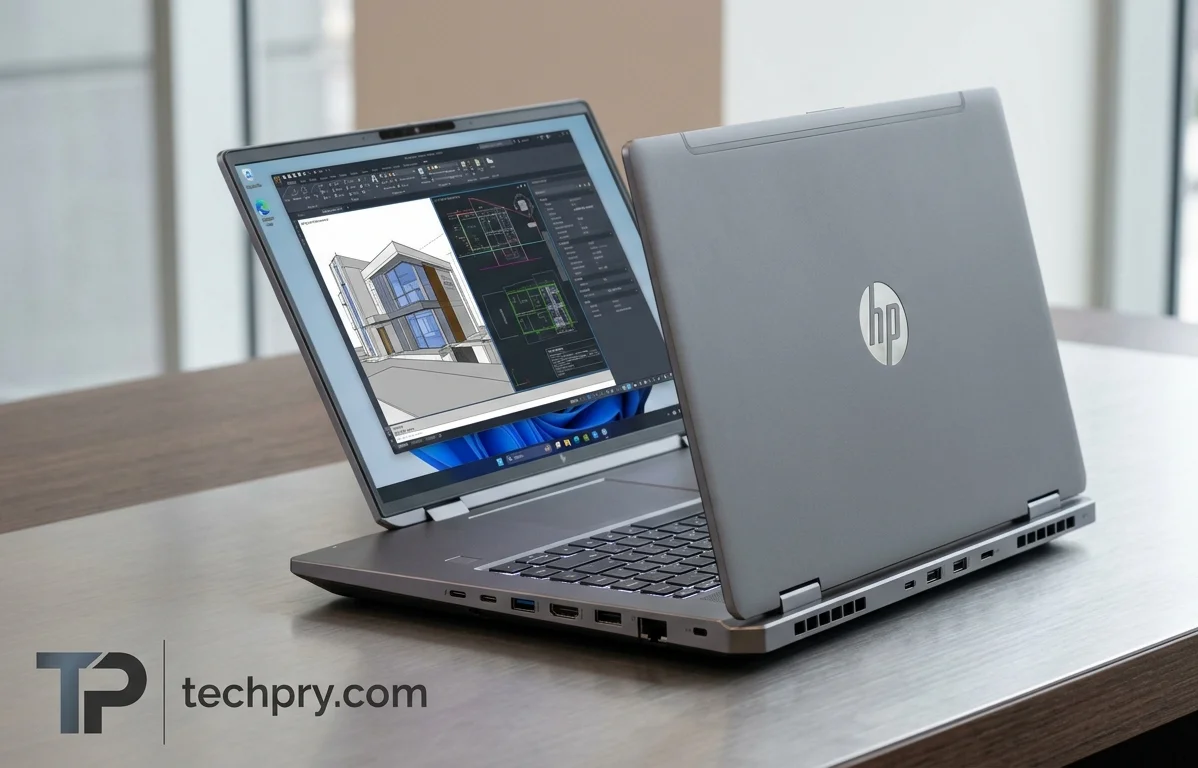
HP ZBook Fury G1i 16” Core Ultra 5 Build: Specs, Upgrade Room and Test Caveats
The specified build pairs entry-level parts with a chassis built for expansion, while the only benchmark and battery results published for this laptop come from a far higher-end configuration.
Contents
- Performance: what the one benchmark comparison shows and what HP claims
- Battery life: a 99 Wh pack, one workday-style result and the charging options
- Processor: the Core Ultra 5 245HX and how other units differ
- Graphics: an 8 GB Blackwell GPU, and the bigger cards in other units
- RAM: 16 GB in two modules, four slots, up to 192 GB
- Storage: one 512 GB drive on a fast bus, with slots to spare
- Tool-free access and upgrade options for RAM and storage
- Display: a matte 16-inch IPS panel and the sharper options
- Wireless and ports
- USB-A, USB-C and Thunderbolt: how many ports and how fast
- Video output, Ethernet, audio and card slots
- Cooling: what the hardware is, and what HP claims it does
- Size, weight and build: 2.43 kg in a gray aluminum 16-inch body
- Keyboard and touchpad: backlit island keys, per-key lighting and a glass pad
- Webcam, audio and security features
- Operating system and bundled software
- Who this configuration suits, and who should look higher
The one published benchmark comparison of the HP ZBook Fury G1i 16” was run on a much higher-tier build than the one specified here: a higher-end processor and GPU, 64 GB of RAM against 16 GB, and a 3,840 x 2,400 panel against 1,920 x 1,200 . Read every measured result below with that gap in mind, because the wins belong to a different machine. What the specified configuration offers is entry-level hardware inside a chassis with room to grow: four RAM slots, four storage slots and a 99 Wh battery .
Performance: what the one benchmark comparison shows and what HP claims
HP, Principled Technologies and zstore.be all describe the ZBook Fury G1i as a , and HP lists it as . HP's page does not say which applications are certified, so a buyer who depends on one specific program should confirm it is covered before ordering .
HP's own pitch is that a desktop-class CPU in a laptop can edit 8K video and render in 3D at the same time . That is marketing for the line, not a measured result .
All the measured results come from one review, by Principled Technologies, which pitted a higher-end build (a Core Ultra 9 285HX, an RTX PRO 5000, 64 GB of RAM and a 3,840 x 2,400 display) against a Dell system . Its findings:
- The HP delivered higher GPU PCIe bandwidth in the , which the reviewer says means faster loads and more complex scenes .
- In Applications, which mainly stresses the CPU and RAM, it scored 9.0% higher in Excel and 7.1% higher in PowerPoint, and Principled Technologies reads that as better handling of complex calculations and large datasets .
- Content-creation results were close, though the reviewer argues that small gains add up over a day, a week or a month of repeated tasks .
The office-application scores are the firmest numbers here, because they are the only ones with a stated margin, but they lean on the CPU and RAM, which are exactly the parts where the tested unit differs from this configuration . A 14-core Core Ultra 5 with 16 GB should not be expected to repeat a lead earned by a Core Ultra 9 with 64 GB . The close content-creation result is the more telling one for video and photo editors, because it gives them little to separate the two machines on . The only graphics benchmark figure for the specified GPU itself is a score listed in the spec, covered in the graphics section below .
Battery life: a 99 Wh pack, one workday-style result and the charging options
In the one published test, a ZBook Fury G1i 16” lasted 1 hour 19 minutes longer than a in an office-productivity battery run . The run used the benchmark, which simulates a typical workday in real Microsoft 365 applications . The packs were close in size, 99 Wh on the HP against 96 Wh on the Dell, so capacity alone is unlikely to explain the gap .
The caveats matter. The HP in that test was the higher-end build with the 3,840 x 2,400 display, and light office work is a gentler load than rendering or heavy GPU use, which drain a battery faster . The specified configuration has different parts and a lower-resolution panel, so treat the result as a direction, not a promise .
The battery is a non-replaceable Li-Po, so a worn pack means a service job, not a swap . It supports fast charging and charging over , with charging ports on the left and right sides . The spec lists charger options of 150, 200 and 280 W and a 1 m cable, but not which wattage ships with which configuration, so check the charger on the exact model before buying .
Processor: the Core Ultra 5 245HX and how other units differ
The is the chip in the specified build, with 14 cores (6 performance plus 8 efficiency), 14 threads, a 3.1 GHz base clock and a 5.1 GHz turbo . With as many threads as cores, there is one thread per core . The chip has 24 MB of L3 cache, is built on a 3 nm process and includes Intel UHD Graphics Xe G4 (48 EU) integrated graphics next to the discrete GPU . HP states that the processor line offers up to 13 , a figure given for the family rather than for this specific chip .
The other units carry a larger processor. Principled Technologies tested an with Intel vPro, and zstore.be lists the same chip as 24-core with 36 MB of cache and a 5.5 GHz rating . Set against the spec's 14 cores, 24 MB of cache and 5.1 GHz turbo, that is a wide gap on paper, and multi-threaded jobs such as rendering are where extra cores usually count most . It also means the CPU-bound office scores in the performance section describe the Ultra 9, not the chip in this build .
Graphics: an 8 GB Blackwell GPU, and the bigger cards in other units
The graphics are handled by a dedicated Laptop (Blackwell) with 8 GB of on a 128-bit bus at about 24 Gbps . HP's page describes laptop GPUs for the line as a whole, not this one model . On a 5 nm process, the GPU has 2560 shading units, 80 texture mapping units and 32 raster operations pipelines, with a compute rating of 8.3-12.3 TFLOPS .
The spec also lists a score of 30775 . With no rival score beside it, that number sits on a scale without ranking the GPU against anything, so it becomes useful only if you find the same test for a competing laptop .
Other units carry bigger cards. Principled Technologies tested an RTX PRO 5000, and zstore.be lists an RTX PRO 4000 with 16 GB of GDDR7 ECC . That listing's 16 GB is twice the spec's 8 GB, and video memory tends to be the limit that large scenes and datasets hit first, so anyone working with heavy 3D or simulation files should read the 8 GB build as the entry point, not the ceiling .
RAM: 16 GB in two modules, four slots, up to 192 GB
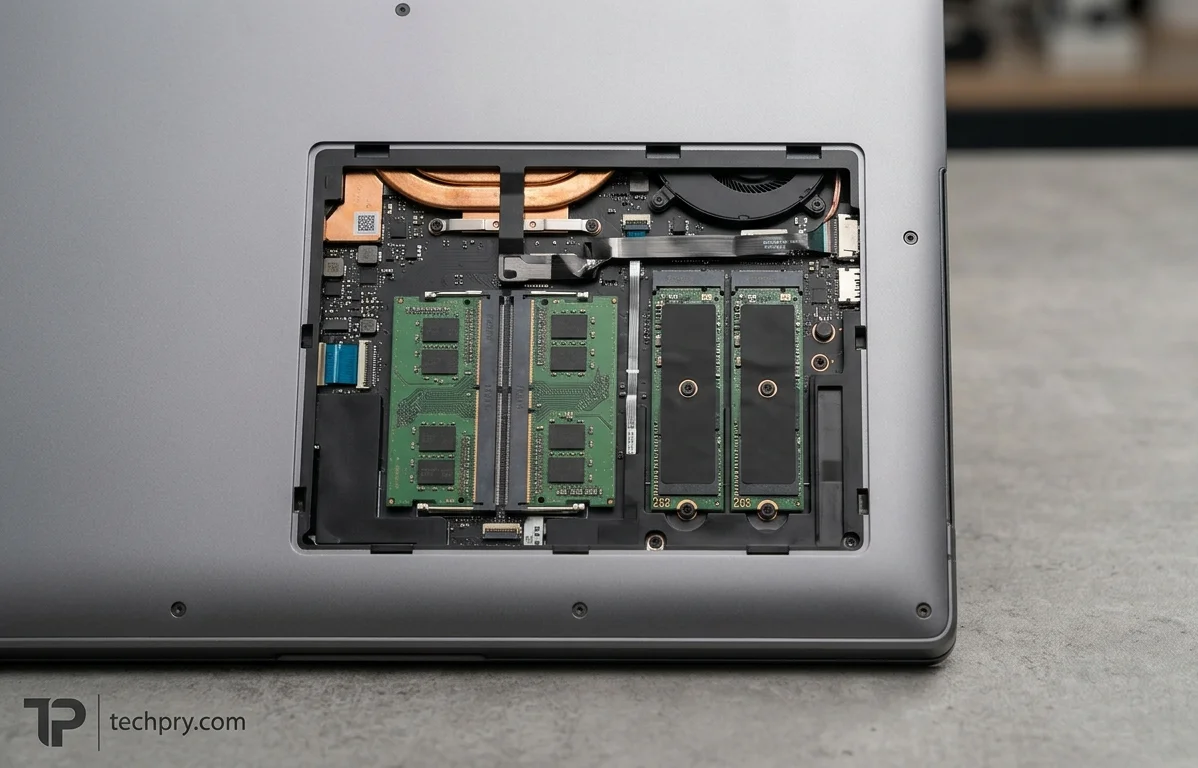
Memory is the thin spot of this configuration: 16 GB of DDR5, installed as 2 x 8 GB modules, in a machine whose four slots accept up to 192 GB . It runs at 5600 MHz as memory, in the module format .
Other units differ: Principled Technologies tested 64 GB, and zstore.be lists a single 32 GB module . A lone module generally cannot run in dual-channel mode, so the listing's larger capacity comes with a likely bandwidth cost that the spec's pair of modules avoids . For a workstation, 16 GB is the part most likely to feel small, and because RAM is upgradable and only two of the four slots are filled on paper, it is also the easiest limit to lift .
Storage: one 512 GB drive on a fast bus, with slots to spare
A single 512 GB M.2 on a x4 bus is the starting point, and the spec lists four storage slots to grow into . Storage is upgradable .
Other units start higher: Principled Technologies' systems and the zstore.be listing both carry 1 TB, twice the spec's 512 GB . A Gen 5 interface describes the connection's ceiling, not what the installed drive delivers, and the spec gives no drive speed . Capacity is the more practical figure: 512 GB fills quickly with project files, caches and media, and with one drive in four slots, adding a second looks simpler than replacing the first .
Tool-free access and upgrade options for RAM and storage
HP says components can be reached without tools, and the spec marks both RAM and storage as upgradable . That is HP's own description of the design, so it is a claim about intent rather than a verified service experience .
The spec's slot counts show how much room there is to use: with 2 x 8 GB of RAM in four slots and one 512 GB drive in four storage slots, two memory slots and three storage slots look free on paper . For a buyer who plans to start with this entry build and add memory and drives later, that headroom is the practical case for starting here .
Display: a matte 16-inch IPS panel and the sharper options
The specified screen is a 16-inch, 16:10 matte at 1920 x 1200 and 60 Hz, covering 100% of with up to 400 nits of brightness . That works out to 142 ppi, and an ambient light sensor is included . It is not a touchscreen and has no HDR, adaptive refresh rate or sync technology .
It is a conventional workstation baseline: full sRGB coverage suits standard-gamut work, the matte finish handles glare, and the spec lists no HDR, so HDR grading is out on this panel .
HP says multiple panel options exist . Principled Technologies' unit had a 3,840 x 2,400 display, and zstore.be lists a 3840x2400 panel rated at 500 nits and 100% sRGB . By that listing, the step up buys resolution and 100 more nits, but the same 100% sRGB figure as the spec, so it is about sharpness and brightness rather than a wider sRGB number . Check which panel a given unit has: the battery result earlier came with the sharper screen, not this one .
Wireless and ports
Wireless support is and , and zstore.be names an Intel BE200 module for both . HP calls the port selection extensive, which is its own marketing description ; the two subsections below list what is actually on the chassis.
USB-A, USB-C and Thunderbolt: how many ports and how fast
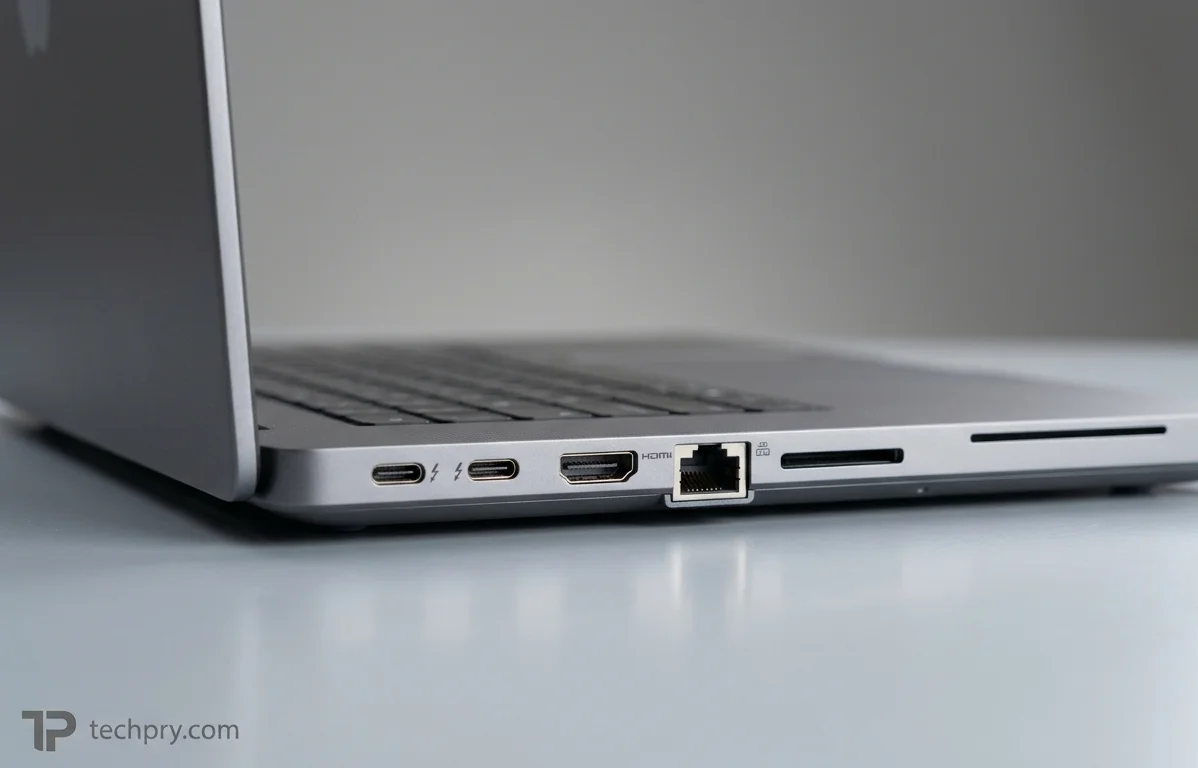
The laptop has three USB-C ports and one USB-A. The spec lists 3 USB Type-C ports supporting USB 4.0, while zstore.be breaks them down as two ports on the left side and one port on the right . The single USB Type-A port runs at 10 Gbps .
HP's page lists Thunderbolt 5 at 80 Gbps alongside a Thunderbolt 4 port, and zstore.be puts that Thunderbolt 4 port at 40 Gbps . The Thunderbolt USB-C ports support USB Power Delivery and .
| Port | Count | Speed | Notes |
|---|---|---|---|
| Thunderbolt 5 (USB Type-C) | 2, per zstore.be | 80 Gbps | USB Power Delivery and DisplayPort 2.1 |
| Thunderbolt 4 (USB Type-C) | 1, per zstore.be | 40 Gbps | Right side, per zstore.be |
| USB Type-A | 1 | 10 Gbps | Listed as USB 3.2 in the spec |
In daily use, the 80 Gbps pair is the one to reserve for a dock or high-resolution external displays, leaving the 40 Gbps port and the USB-A for lighter peripherals . One USB-A port is also all there is for legacy accessories, so anyone with several of them will likely want a hub .
Video output, Ethernet, audio and card slots
Video output comes from a single port, with no dedicated DisplayPort and no VGA . The gap is smaller than it looks, because the Thunderbolt USB-C ports support DisplayPort 2.1, so a second or third external display would go through one of those ports or a dock rather than a dedicated jack .
The wired network port is an RJ45 jack at , which means a wired desk setup is not held to gigabit speeds if the network behind it supports 2.5 GbE . The rest of the list is a headphone/microphone combo jack, an SD card reader, a proprietary power connector and a . There is no optical drive .
Cooling: what the hardware is, and what HP claims it does
The cooling system is active, with a and two fans, and it does not use . HP markets the design as and says it protects the workstation from overheating so the heaviest workloads can run at peak processing power .
That promise is HP's claim, and no temperature, noise or sustained-clock figures back it up . A vapor chamber and two fans make a solid hardware list for a 27 mm chassis, but whether this laptop holds its clocks through a long render is a question the published numbers leave open . Skipping liquid metal is not a red flag in itself; it simply means the chip is not using that higher-conductivity option .
Size, weight and build: 2.43 kg in a gray aluminum 16-inch body
The laptop weighs 2.43 kg and measures 359 x 249 x 27 mm, figures the zstore.be listing matches . Its footprint is 894 cm2, with a screen-to-body ratio of about 83% and 7.2 mm side bezels . The body is gray aluminum, in a standard clamshell rather than a convertible .
At 2.43 kg and 27 mm thick, this is a machine you carry between desks rather than one you forget in a bag, and the higher-wattage charger options will add to that load . There is no tablet mode and no touchscreen to offset the bulk .
Keyboard and touchpad: backlit island keys, per-key lighting and a glass pad
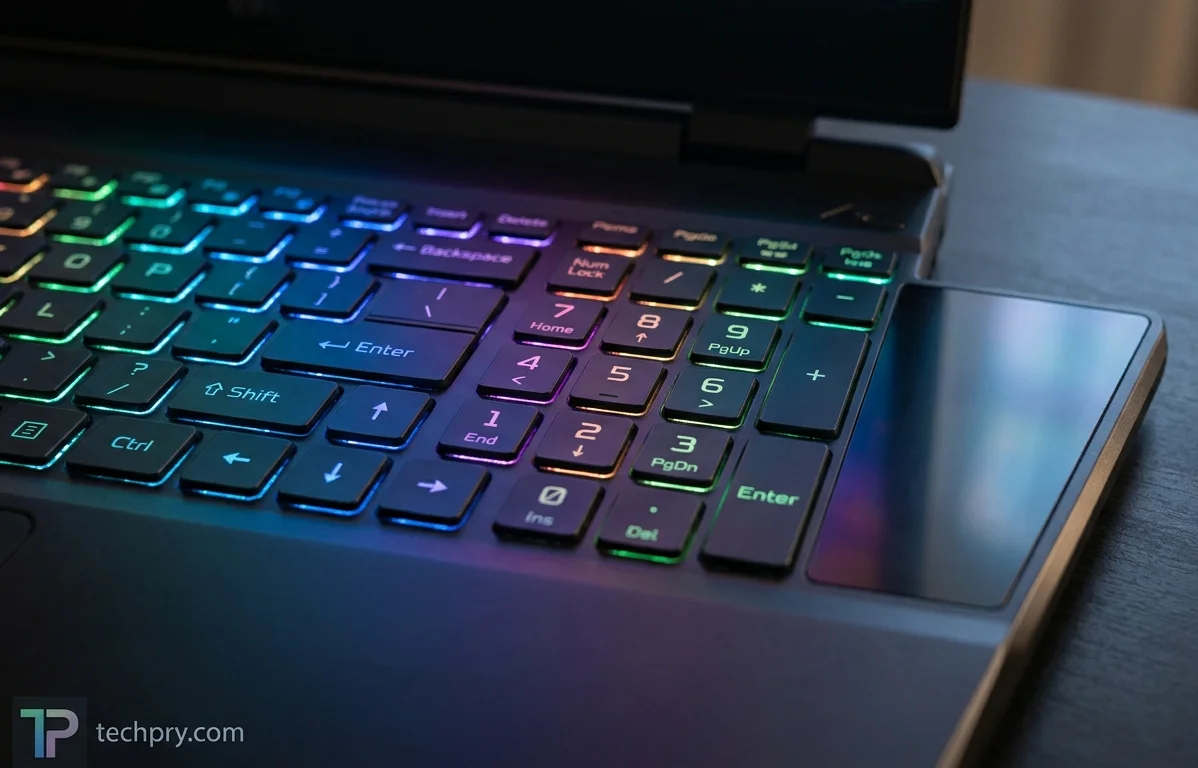
The keyboard is island-style with a numeric keypad and backlighting, and the touchpad has a glass surface, supports and is listed as a three-button design .
HP's page goes further, describing that the software can customize, including highlighting specific keys . The software also carries pre-selected application shortcuts, and the applications HP names appear in the software section below . It can set ambient lighting to complement project colors or match a mood .
The spec itself says only that the keyboard is backlit, so confirm the RGB per-key detail on the exact unit you are buying . The per-key shortcuts will matter mostly to people who spend their day in a few creative or CAD programs .
Webcam, audio and security features
The webcam sits above the display at 2560 x 1440 with an infrared sensor, alongside two microphones and a four-speaker 4.0 system that does not support . zstore.be describes the camera as 5MP with IR and dual-array microphones, and HP lists among the additional features without saying what it adds .
Security hardware is a mix of options: a fingerprint reader that is optional, a , a Kensington nano lock slot and . The fingerprint reader is the one to check on a specific listing, since the spec calls it optional rather than included . The smart card reader matters mainly to organizations that require card-based sign-in, and HP lists Onlooker Detection by name only, so what it does is not described .
Operating system and bundled software
The laptop runs , and the zstore.be configuration ships Windows 11 Pro . HP lists among its additional features without describing what it does . The notable bundled tool is Z Light Space, which handles keyboard lighting and offers pre-selected shortcuts for apps such as Adobe After Effects and . For anyone who lives in those programs the shortcuts are the useful part; for everyone else the software list is short .
Who this configuration suits, and who should look higher
This build suits a buyer who wants a workstation chassis with ISV certification, Thunderbolt 5 ports and a 99 Wh battery, and who is happy to grow the machine after purchase, since open RAM and storage slots make the entry-level parts the easiest ones to upgrade . It also fits anyone for whom a matte, full-sRGB 1920 x 1200 panel is enough .
Look at the higher-tier builds instead if the processor or the GPU is the reason for buying. The zstore.be build lists a 24-core CPU and 16 GB of graphics memory against 14 cores and 8 GB here, and every measured result above comes from a higher-end build too . Buyers who need HDR or touch should also note that this panel offers neither .
Comments 0
Please log in or sign up to comment.