
Nvidia GeForce RTX 5060 Laptop: FPS by Resolution, Power Limits and Who Should Upgrade
The chip's real-world speed depends on the wattage a laptop maker sets, and a leaked 18% gain over the RTX 4060 makes it a sensible step for RTX 30-series owners but a small one for RTX 40-series owners.
Contents
- What the RTX 5060 Laptop is: a mid-range Blackwell GPU for gaming laptops
- Release date: presented in April 2025, in laptops from May 2025
- RTX 5060 laptop gaming performance: 128 FPS on average at 1080p High, 45 FPS at 4K Ultra
- RTX 5060 laptop FPS at 1080p High: 128 FPS on average, from 80 to 228
- RTX 5060 laptop FPS at 1080p Ultra: 105 FPS on average
- RTX 5060 laptop FPS at 1440p Ultra: 78 FPS on average, with the heaviest games near 50
- RTX 5060 laptop FPS at 4K Ultra: 45 FPS on average, from 22 to 67
- Why RTX 5060 laptops perform differently: a 45–115 W power range and clocks that follow it
- Laptops that use the RTX 5060: three configurations and how they are set up
- RTX 5060 laptop benchmark scores: Time Spy 12,293, Port Royal 7,357 and a G3D result of 17,305
- RTX 5060 Laptop vs RTX 4060 Laptop: about 18% faster in leaked OpenCL results
- Nvidia's claim of more than double the RTX 4060 laptop's frames (146 vs 60 fps) and why to temper expectations
- How the RTX 5060 Laptop compares with the RTX 4070 laptop and its neighbours in the 50 Series
- Is the RTX 5060 Laptop worth upgrading to from an RTX 30-series or RTX 40-series laptop?
- Is the RTX 5060 Laptop good value? About £970 average price and a 6.0/10 value score
- Score breakdown: performance and memory sub-scores of 4.5 each, against a 9.0 user score
- What the Blackwell feature set adds: frame generation, Reflex, Studio and ray tracing
- Core configuration: 3,328 shaders, 104 AI cores, 26 ray-tracing cores and 32 MB of shared L2
- Raw compute throughput: 9.7–16.6 TFLOPS FP32, 151–260 GTexel/s and 572 TOPS of AI performance
- Memory: 8 GB on a 128-bit bus with 384 GB/s of bandwidth
- Manufacturing: 4 nm, a 181 mm² die, 21.9 billion transistors and an 89°C maximum
- API, interface and display support: DirectX, Vulkan, OpenGL, PCIe and up to 4 displays
- Who the RTX 5060 Laptop suits, and who should skip it
An RTX 5060 laptop can be a 45 W compromise or a 100 W gaming machine, and the badge alone does not tell you which . The spec lets manufacturers configure the chip anywhere from 45 to 115 W , and Notebookcheck's clock figures show what that spread does: 952–1455 MHz at 45 W against 1950–2310 MHz at a full 100 W . That range looks like a bigger variable than the generational gain. Leaked OpenCL results put the chip about 18% ahead of a typical RTX 4060 laptop , which Club386 calls a decent but modest bump, enough to tempt RTX 30-series owners and not enough for RTX 40-series owners .
What the RTX 5060 Laptop is: a mid-range Blackwell GPU for gaming laptops
It is a discrete Nvidia GPU for gaming laptops, aimed at the mid-range and built on the around the chip . The spec labels the architecture Blackwell 2.0 , and Notebookcheck's table lists the codename as GN22-X4 even though its text also names GB206 as the chip .
Within the laptop RTX 50 Series it sits between its two closest siblings, both covered further down , and Notebookcheck files it under medium-sized notebooks . Anphat PC says Nvidia positions it for creators as well as gamers, with acceleration for creative apps, AI and CUDA workflows . The spec recommends an or above as its CPU partner , though that works as guidance more than a rule, since the laptops covered below pair the chip with three different processors .
Release date: presented in April 2025, in laptops from May 2025
The spec gives April 14, 2025 as the release date, and Notebookcheck likewise says the GPU was presented in April 2025 . Notebookcheck's table also lists the date of announcement as 02.01.2025, which falls before April whichever way the day and month are read . Laptops with the chip became available in May 2025, according to Notebookcheck, and Club386 was awaiting a May release date when it covered the leaked results .
RTX 5060 laptop gaming performance: 128 FPS on average at 1080p High, 45 FPS at 4K Ultra
This is a 1080p-class GPU that stretches to higher resolutions with compromises. Anphat PC says it aims at a good Full HD/FHD+ experience and can handle higher resolutions depending on the game, the graphics settings and each laptop's GPU power level . Notebookcheck recommends QHD with maximum settings and , or with slightly reduced detail in demanding games such as , and its own gaming tests still put the older mobile RTX 4070 slightly ahead .
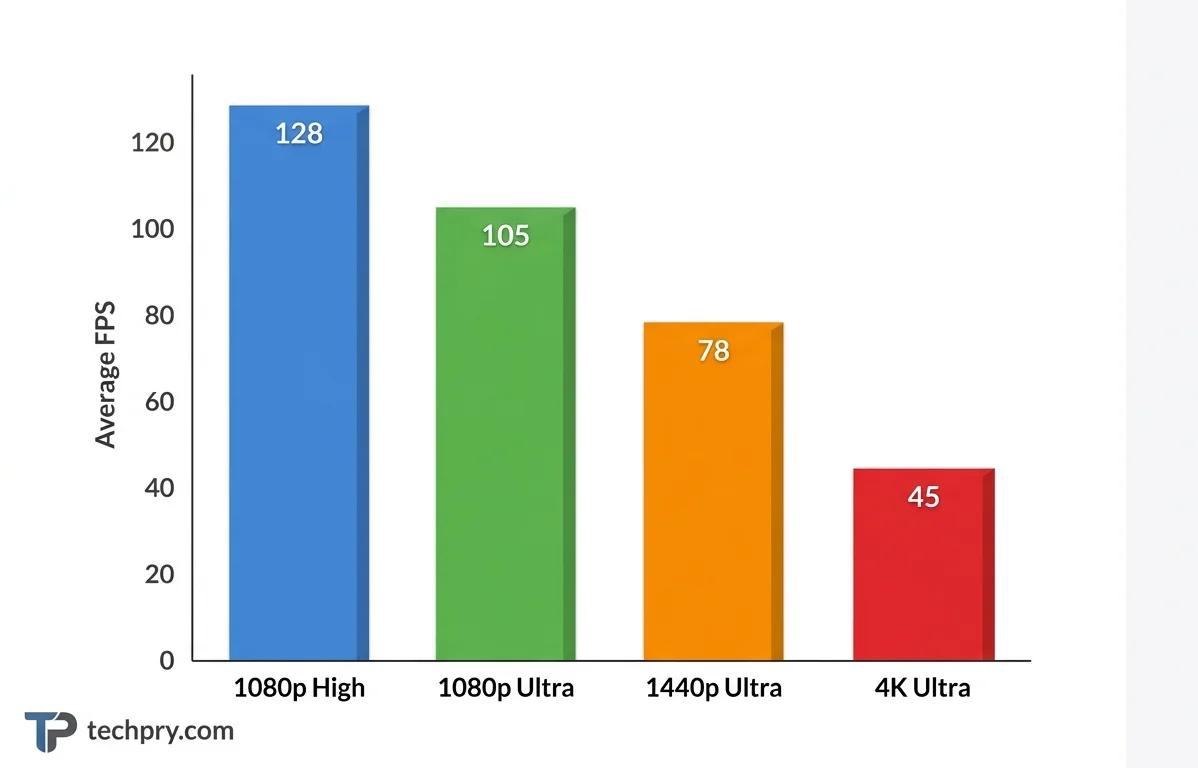
The spec's FPS table backs that up with nine games measured at 1080p High, 1080p Ultra, 1440p Ultra and 4K Ultra . The averages fall from 128 FPS to 105, 78 and 45 across those four setups , and the spec rates the margin of error of those averages as Low . In practice both 1080p averages stay above 100, three heavy games slip to around 50 FPS at 1440p Ultra , and 4K Ultra lands at well under half the 1080p High figure . Per-game results follow, with a full grid at the end of the block.
RTX 5060 laptop FPS at 1080p High: 128 FPS on average, from 80 to 228
At 1080p High the nine tested games average 128 FPS . leads at 228 FPS, follows at 153, and Call of Duty sits at 108 . The slowest title in the set still reaches 80 FPS , but that is well under half the speed of the fastest, so the 128 average describes the middle of the pack rather than any one game .
RTX 5060 laptop FPS at 1080p Ultra: 105 FPS on average
Moving from High to Ultra at 1080p trims the average from 128 FPS to 105 . The heaviest games still hold up: slips from 95 FPS to 82 and from 87 to 73 . Counter-Strike 2 manages 173, The Witcher 3 127 and Call of Duty 100 , while the weakest result in the set is 67 FPS . For these titles 1080p Ultra is a realistic target, which fits Anphat PC's Full HD framing .
RTX 5060 laptop FPS at 1440p Ultra: 78 FPS on average, with the heaviest games near 50
1440p Ultra is where the games split into two groups. The average falls to 78 FPS . Counter-Strike 2 reaches 120, The Witcher 3 93, 85 and Call of Duty 72 . Three heavier titles bunch near 50: Hogwarts Legacy at 53, at 52 and Cyberpunk 2077 at 49 . Those are the kind of games Notebookcheck's advice about trimming detail or leaning on DLSS is aimed at, which makes 1440p a setting that works but asks something of the player .
RTX 5060 laptop FPS at 4K Ultra: 45 FPS on average, from 22 to 67
4K Ultra is a stretch for this chip. The average is 45 FPS . Counter-Strike 2 stands alone at 67, with at 55, at 53, The Witcher 3 at 51 and Far Cry 6 at 50 . Call of Duty is at 48, and the bottom three run at 31 (Hogwarts Legacy), 28 (Ghost of Tsushima) and 22 FPS (Cyberpunk 2077) . Neither outlet that comments on resolution points buyers here: Anphat PC aims at Full HD/FHD+ and Notebookcheck's recommendation stops at QHD .
The full grid for all nine games, in FPS:
| Game | 1080p High | 1080p Ultra | 1440p Ultra | 4K Ultra | Fact |
|---|---|---|---|---|---|
| Counter-Strike 2 | 228 | 173 | 120 | 67 | |
| The Witcher 3 | 153 | 127 | 93 | 51 | |
| Shadow of the Tomb Raider | 144 | 130 | 97 | 53 | |
| Forza Horizon 5 | 137 | 85 | 77 | 55 | |
| Far Cry 6 | 116 | 106 | 85 | 50 | |
| CoD: Modern Warfare III | 108 | 100 | 72 | 48 | |
| Cyberpunk 2077 | 95 | 82 | 49 | 22 | |
| Hogwarts Legacy | 87 | 73 | 53 | 31 | |
| Ghost of Tsushima | 80 | 67 | 52 | 28 | |
| Average | 128 | 105 | 78 | 45 |
Why RTX 5060 laptops perform differently: a 45–115 W power range and clocks that follow it
Two laptops sold with the same GPU name can perform noticeably differently, because the spec makes the chip's configurable from 45 to 115 W and leaves the setting to the laptop maker . Anphat PC and Notebookcheck both say real-world performance depends on that power limit and on the cooling system around it .
The clock speeds move with it. The spec gives a base clock of 952–1455 MHz and a boost clock of 1455–2497 MHz, both configurable . Notebookcheck's example makes the effect concrete: 952–1455 MHz at 45 W and 1950–2310 MHz at a full 100 W . Those two ranges do not overlap at all, so a 45 W machine and a 100 W machine are running the same silicon in very different states .
Anphat PC frames this as flexibility: the chip can sit in thin, balanced Nitro laptops or in higher-power Predator models that favor gaming and sustained performance . For a buyer, the same flexibility means the GPU name says less than the wattage on the laptop's own spec sheet . The per-game FPS numbers above are best read as typical of the chip, not a guarantee for any one laptop .
The published figures do not agree on every detail of the range. Notebookcheck gives a 100 W maximum where the spec says 115 W . That gap may be partly a matter of measures rather than a true contradiction, because Acer's Predator setup uses both numbers, a 100 W TGP and a 115 W maximum . Frontum lists a single 45 W thermal design power, which matches only the bottom of the spec's range . Notebookcheck also labels 952–1455 MHz as the boost range, where the spec treats it as the base clock and puts boost at 1455–2497 MHz .
Laptops that use the RTX 5060: three configurations and how they are set up
Three configurations show how much the setup varies. The PHN16-73-757W pairs an Intel Core Ultra 7 255HX with the RTX 5060 8GB, 32GB of DDR5 and a 1TB SSD ; Acer sets the GPU at 100W TGP with a 115W maximum , and the configuration supports . The Acer Nitro ProPanel ANV16S-61-R9ZV combines an AMD Ryzen AI 7 350 with the RTX 5060 8GB, 32GB of DDR5 and a 1TB SSD, and Anphat PC says its GPU runs at a lower power level than the Predator's . In PCMag's coverage, the B2RWFKG-071US configuration uses an Intel Core 7 240H, 16GB of 5,600MHz DDR5 and a 512GB SSD .
The Predator and the Nitro are the two ends of Anphat PC's flexibility argument: a higher-power machine aimed at sustained gaming and a lower-power, thinner one aimed at balance . Memory and storage differ as well, from 16GB and 512GB in the MSI to 32GB and 1TB in both Acers . A buyer who wants the highest frame rates should look for the Predator-style power setting, and one who values a lighter machine should expect to give some of that up .
RTX 5060 laptop benchmark scores: Time Spy 12,293, Port Royal 7,357 and a G3D result of 17,305
Frontum lists a score of 12,293 points and a Port Royal score of 7,357 , plus results of 17,305 in G3D and 6,246 in DirectCompute . Club386 adds leaked OpenCL results of 102,564 to 109,431 points .
These numbers need context to be useful. Time Spy and Port Royal test different things, rasterised DirectX 12 gaming and ray tracing respectively, so the gap between 12,293 and 7,357 is not a flaw . The leaked OpenCL entries come from a compute test rather than a game, and they appear to originate from systems under development by GPU maker Colorful, which makes them provisional . And with a 45–115 W power range behind the chip's name, any single score is one point on a wide scale rather than a rating every laptop will match .
RTX 5060 Laptop vs RTX 4060 Laptop: about 18% faster in leaked OpenCL results
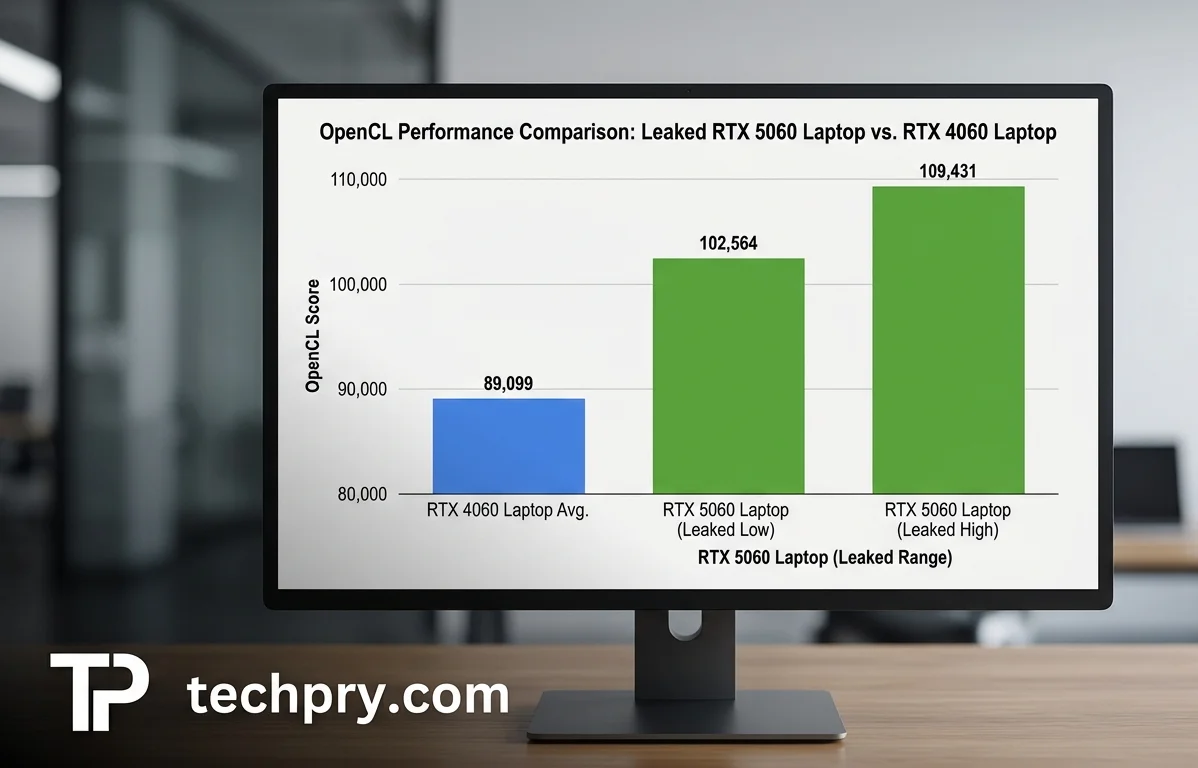
Its predecessor is the , and leaked OpenCL results of 102,564 to 109,431 points place the new chip around 18% ahead of a typical RTX 4060 laptop GPU, which averages around 89,099 . Club386 calls that a decent bump but a small, modest step, far from a transformative leap and well short of the gains it saw between 90-class models .
Two things limit how much weight the 18% can bear. It comes from a compute benchmark rather than from games, so it says less about frame rates than a game test would . And it rests on entries that appear to come from Colorful systems under development . As a guide to the generational step it is a useful signal, but it is not a verdict on every laptop that will ship with the chip .
Nvidia's claim of more than double the RTX 4060 laptop's frames (146 vs 60 fps) and why to temper expectations
Club386 advises tempering expectations about Nvidia's first-party numbers, which look impressive but come with little to no detail on how they were produced . Nvidia's figures show more than double the frames at lower latency than the RTX 4060 laptop: 146 fps against 60 fps, with latency values of 56 and 68 in Club386's table .
The claim and the leaked 18% compute lead measure different things, so they do not strictly contradict each other, but they paint very different pictures of the upgrade . Until the method behind the first-party figure is disclosed, the more conservative leaked gain is the safer anchor for a purchase decision .
How the RTX 5060 Laptop compares with the RTX 4070 laptop and its neighbours in the 50 Series
Against the older , the answer depends on the test. Notebookcheck's synthetic benchmarks put the RTX 5060 Laptop just ahead, while its own gaming tests have the mobile RTX 4070 still slightly faster . Both margins are small, so for a buyer who cares about games the older chip remains a fair alternative .
Inside the laptop RTX 50 Series, the chip sits between the and the . Anphat PC says it has more performance headroom than the RTX 5050, which it lists at 2,560 shaders and 440 AI TOPS against 3,328 and 572 TOPS here, while it stays below the RTX 5070 and higher models . On paper that makes it a clear step up from the model beneath it and a step short of the tier above .
Is the RTX 5060 Laptop worth upgrading to from an RTX 30-series or RTX 40-series laptop?
Club386's verdict splits by generation: the chip offers just enough to persuade owners of (RTX 30-series) laptops to upgrade, but not enough to move owners of (RTX 40-series) ones .
The reasoning follows from the size of the step. A gain of about 18% in leaked OpenCL scores is a decent but modest bump , and Notebookcheck's gaming tests have the older mobile RTX 4070 still slightly ahead, which leaves little to gain for anyone already on RTX 40-series hardware . None of the figures measure the jump from an RTX 30-series chip directly, so how much an Ampere owner gains will depend on which model they are leaving and on the power limit of the new laptop . The verdict also comes from a single outlet working from a leak, so it is a reasoned guess rather than a settled consensus .
Is the RTX 5060 Laptop good value? About £970 average price and a 6.0/10 value score
The numbers say middling, though the outlets frame it differently. Frontum lists an average price of about £970 and a value-for-money score of 6.0 out of 10 . That score blends a 6.3 overall rating (60% weight) with a 5.4 price score (40%) , and the 6.3 rating is worse than that of 70% of the graphics cards in Frontum's database .
Anphat PC is more upbeat. It calls the chip one of the attractive price/performance balance points of mid-range gaming laptops, creating a segment between mainstream and high-end models and offering 8GB of VRAM and the new Blackwell technologies without needing a higher-tier GPU . The two verdicts are less opposed than they look: Frontum ranks the chip against all the graphics cards in its database, while Anphat PC judges it within mid-range gaming laptops, so the 6.0 and the praise answer different questions . For a laptop buyer the second question is the practical one, though Frontum's 5.4 price score is a reminder that the price actually paid decides the outcome .
Score breakdown: performance and memory sub-scores of 4.5 each, against a 9.0 user score
Frontum's technical score is 6.0 out of 10, worse than that of 74% of the graphics cards in its database . It is built from six weighted parts:
| Component | Score (out of 10) | Weight | Fact |
|---|---|---|---|
| Performance | 4.5 | 44% | |
| Memory | 4.5 | 24% | |
| Power & cooling | 9.2 | 12% | |
| Platform & features | 10 | 11% | |
| Design | 7.6 | 5% | |
| Connectivity & media | 8.5 | 4% |
The two heaviest components, performance and memory, both score only 4.5, and that is what holds the technical score down, while the lighter categories score well, including 9.2 for power and cooling and a full 10 for platform and features . The user score is 9.0 out of 10, and the popularity score of 9 out of 10 is higher than that of 84.2% of products in its category . Users like the chip far more than the technical model does, but the user score carries only 10% of the overall score, lifting it from 6.0 to 6.3 .
What the Blackwell feature set adds: frame generation, Reflex, Studio and ray tracing
The GPU supports , which Notebookcheck specifies as Reflex 2 , and , which fits Nvidia's pitch to creators . Ray tracing is supported too, and Anphat PC describes it as 4th generation . Advanced Optimus support is listed for the Acer Predator configuration specifically, not for the GPU itself .
Club386 credits the generation with improved scheduling, AI acceleration and better ray tracing throughput, and with faster memory modules that add bandwidth while capacity stays at 8GB . It also says DLSS 4 and Multi-Frame Generation can greatly improve battery life .
These features do not carry equal weight in a purchase. Frame generation and DLSS matter most for the 1440p buyer, because the heaviest games sit near 50 FPS there and Notebookcheck's QHD advice leans on DLSS . Reflex is most relevant to competitive shooters, the use the Counter-Strike 2 results point to . The battery-life claim comes from a single outlet and is stated without a figure, so it is a reason to look for battery tests of specific laptops rather than a number to plan around .
Core configuration: 3,328 shaders, 104 AI cores, 26 ray-tracing cores and 32 MB of shared L2
The GPU has 3,328 , and the spec, Anphat PC, Notebookcheck and Frontum all give that figure . Around them sit 104 texture mapping units, 48 render output units and 26 compute units , plus 104 and 26 ray-tracing cores . Anphat PC describes the tensor cores as fifth generation . The chip executes 2 instructions per cycle .
On cache, the spec lists 128KB of L1 per cluster and 32MB of shared , and Notebookcheck agrees on 32 MB of L2 but lists L1 as 3.3 MB . The two L1 figures are probably the same thing counted differently: spread across the 26 compute units, 128KB each comes to roughly the 3.3 MB total, assuming a compute unit corresponds to a cluster . A large shared L2 is also the usual way to help a card with a 128-bit bus keep its cores fed .
Raw compute throughput: 9.7–16.6 TFLOPS FP32, 151–260 GTexel/s and 572 TOPS of AI performance
FP32 performance is 9.7–16.6 TFLOPS in the spec, alongside a pixel fill rate of 70–120 GPixel/s and a texture fill rate of 151–260 GTexel/s . Notebookcheck and Frontum both list about 9.7 TFLOPS, which is the bottom of the spec's range . That range appears to track the boost-clock range, with 9.7 TFLOPS lining up with the 1455 MHz low end and the top with 2497 MHz, so a single quoted 9.7 most likely describes the low end of the power range rather than a high-power laptop .
FP16 theoretical performance is about 9.68 TFLOPS , while FP64 is only 0.15 TFLOPS in Frontum's listing, so double-precision workloads are not what this chip is for . AI performance is 572 TOPS, INT8 according to Notebookcheck and the same figure Anphat PC cites .
Memory: 8 GB on a 128-bit bus with 384 GB/s of bandwidth
The GPU carries 8 GB of on a 128-bit bus . The spec, Anphat PC, Notebookcheck, Frontum and Club386 all list 8 GB . The memory clock is 1500 MHz (24000 Mbps effective), consistent with the 384 GB/s of bandwidth that the spec, Anphat PC and Notebookcheck give . The memory has no ECC support, and Notebookcheck lists no shared memory .
The trade-off is capacity versus speed. Club386 notes that the chip sticks with 8GB but gains bandwidth from faster modules , and Frontum's memory sub-score of 4.5 out of 10 likely reflects that capacity . Capacity is fixed whatever the laptop's power level, so unlike speed it cannot be traded up by choosing a higher-wattage model .
Manufacturing: 4 nm, a 181 mm² die, 21.9 billion transistors and an 89°C maximum
The chip is made by on a 4 nm process, according to the spec, with Notebookcheck's table adding the 4N FinFET label . Notebookcheck's text calls the process 5 nm, which conflicts with the spec's 4 nm figure, though its own 4N label reads closer to the spec's number than to its prose . The die measures 181 mm² and holds 21.9 billion transistors, figures the spec and Notebookcheck both give , and the spec's density of 120.99 MTr/mm² is consistent with those two numbers .
The spec puts the maximum temperature at 89°C . How close a laptop runs to that ceiling depends on its cooling, which Anphat PC and Notebookcheck both name as a performance factor .
API, interface and display support: DirectX, Vulkan, OpenGL, PCIe and up to 4 displays
The GPU supports , OpenGL 4.6 and OpenCL 3.0 , and connects over a x16 interface . Notebookcheck adds shader model 6.8 and support for up to 4 displays .
The spec lists CUDA 12.0 and DisplayPort 2.1b, while Notebookcheck lists CUDA 12.8 and DisplayPort 2.1a . Neither difference is likely to change a buying decision, but a buyer who needs a particular CUDA version or a specific DisplayPort revision should confirm it against the laptop maker's documentation, since a laptop's display outputs are decided by the laptop and not by the GPU alone .
Who the RTX 5060 Laptop suits, and who should skip it
It suits buyers who play at 1080p, or at 1440p with DLSS and some trimmed settings, and who want Blackwell features without paying for a higher-tier GPU . It also suits owners of RTX 30-series laptops, the group Club386 sees the upgrade as worth the jump for . For all of them, the laptop's power setting is the thing to check before buying, because Predator-style 100 W machines and lower-power Nitro-style ones can differ widely .
Think twice if any of these apply:
- You own an RTX 40-series laptop: Club386 sees too little gain, and Notebookcheck's tests have the older mobile RTX 4070 still slightly ahead .
- You are chasing 4K Ultra, where the average is 45 FPS and Cyberpunk 2077 manages 22 .
- You need more than 8 GB of memory, a capacity that does not change with the power setting .
- You are counting on Nvidia's more-than-double frame claim to hold in games, when Club386 advises tempering expectations .
Comments 0
Please log in or sign up to comment.